Its tax time again and currently about 70% of Americans file their taxes electronically. The IRS is no longer mailing out tax forms unless specifically requested by households. However, if you follow this link to the Brentwood Adult Reference Website you will be able to download all federal and NYS tax forms https://sites.google.com/site/adultreferenceservices/brentwood-community-resources.
In addition, hundreds of the most popular federal tax forms and publications are available for download from http://www.irs.gov for sight impaired individuals. These products range from talking tax forms to Braille formats, and is accessible using screen reading software, refreshable Braille displays and voice recognition software. Click on the links below to download these forms and publications:
Download Accessible Tax Forms (Braille and Text Formats)
Download Accessible Tax Publications (Braille and Text Formats)
Download Accessible Talking Tax Forms
Download Tax Instructions (Large Print Format)
Download Tax Publications (Large Print Format)
The IRS also offers customer service assistance for persons who are deaf or who have hearing disabilities. People with TTY equipment can call 800-829-4059, which is a toll-free number, for assistance.
People who are unable to complete their tax return because of a physical disability may get assistance from an IRS office, or through the Volunteer Income Tax Assistance Program (VITA) sponsored by the IRS. Taxpayers can find a nearby location by calling 1-800-906-9887 or checking the partial list on the IRS’s website.

Tuesday, March 20, 2012

Sunday, March 18, 2012
Shelfari

Shelfari helps you discover new books. Shelfari lets you see what other members are reading now and what books are the most popular. You can even discover the top sellers in your favorite genre! You can connect with friends to see which books you have in common, what they are reading or what they think of the books they have read. You can ask your Shelfari friends for book recommendations or create a group where you can talk about your books. Shelfari lets you build a virtual book shelf to display the books you have read, want to read, or are reading now. Then you can be the critic in rating and reviewing your books so your friends can see what you think. This is an excellent “free” tool to help you discover and pick your next book to read. Once book is selected you can go you your local public library and take out the book or inter-loan from another public library.

Enter in your account information:

Once account is created you can sign in with your credentials.

To add books to your shelf select profile and then “my shelf”.

Now select “I plan to read”.

Select “it’s easy to add your books”.

You can select by “most popular, recent edits, subjects, series, community lists, tags, or by author”.

You can also perform your own custom search then select add.

Now “add” the book you want to your shelf.

Now select one of the three options below and select next.

You can add a review if you like.

You can edit my edition details.

Tag your book.

Then select what to do next and select done.

Now if you select profile and my shelf you will see the book you just added.
Saturday, March 17, 2012
iBooks

iBooks is an amazing way to download and read books. iBooks includes the iBookstore, where you can download the latest best-selling books or your favorite classics – day or night. Browse your library on a beautiful bookshelf, tap a book to open it, flip through pages with a swipe or a tap, and bookmark or add notes to your favorite passages. Watch the prices of the ibooks they tend to be on the high side. You can download the iBook app free!
Requirements:
• iPhone 3G, iPhone 3GS, iPhone 4, iPad, iPod touch (2nd generation), iPod touch (3rd generation), or iPod touch (4th generation) is required.
• iPhone or iPod touch must have iOS 4 or later.
• The iBookstore is available in many countries. The selection of books in the iBookstore may vary by country.
• An Apple ID is required to download from the iBookstore.
• Automatic bookmark syncing requires an active Wi-Fi or cellular data connection and an Apple ID.
• iBooks only opens books published in the ePub electronic book format or documents in the PDF format.
• To add ePub books from outside the iBookstore to iBooks, they must be DRM-free and synced using iTunes 9.2 or later.
• Some PDF documents may not be compatible with iBooks.
Tuesday, January 17, 2012
How do I Download Music onto my Kindle Fire?
To load music onto Kindle Fire:
On PC where you have your music stored, logon onto Amazon website with your credentials and on home screen select manage your Kindle, select manage your mp3’s, accept agreement. Amazon provides you with 5GB worth of storage in Cloud. Select upload music, a pop up window will open asking you to download the “Amazon MP3 uploader”.


If you select all of your music the total size might be more than the allotted 5GB by Amazon. See below in figure 1, highlighted in red I am 0.5 GB over Amazon limit.

To lessen amount of songs being uploaded to Amazon Cloud I unchecked artists.

You will notice below in figure 2, with artists unchecked I have 25 playlists (playlists are a compilation of songs) and 147 songs selected to upload to Cloud. My selections will use 0.9GB of Cloud storage.

Once you have your music selected on your computer select start upload as seen in figure 3 below.
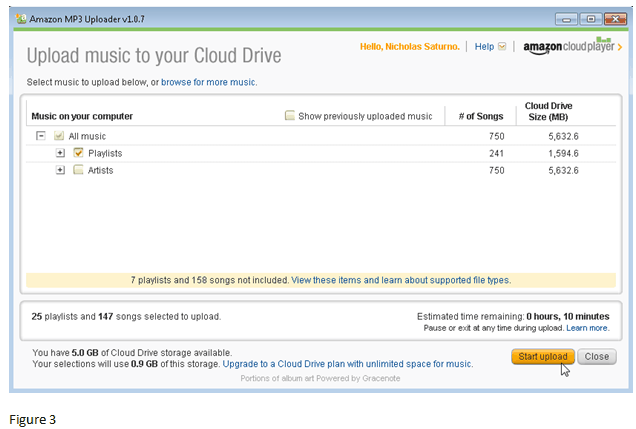
After starting upload you will notice in figure 4 below a status indicator bar estimating time remaining to upload selected songs and playlists. In this example a 147 songs will take 10 minutes to upload to Amazon Cloud.

16 out of 147 songs uploaded with 6 minutes remaining as in figure 5 below.

25 playlists and 147 songs uploaded successfully as in figure 6 below.

Screen below in figure 7 will appear on local computer where you uploaded music to Cloud. You can play music on your local computer right from Cloud if you prefer.

On your Kindle Fire device, select music then select cloud. Your music will be viewable from the Amazon cloud.
Next to song there will be a little download arrow icon. Select download arrow to download song/album onto Kindle Fire device. Once the song is downloaded from the cloud your song will now be physically on your Kindle Fire device. In the music menu you have two tabs “cloud and device” to select from. Each time you select a song from the cloud you will be asked to “would you like to download album xxxx”? Select yes.
Sunday, December 4, 2011
eBook download instructions for Kindle Fire

2. Touch eBooks on side menu bar.
3. On top bar you can change “all formats” to Kindle only. Type in title or genre you are looking for.
4. Touch add to cart, proceed to checkout, select library, enter bar code on back of library card, touch go select 7 or 14 day checkout, touch confirm check out, and touch get for Kindle.
5. You will automatically be navigated to Amazon website. Touch “get library book”. (You will notice deliver to: icon below “get library book”. If you have multiple devices - Kindles or even iPad2 – you have to register with Amazon) you can select which device you want eBook delivered to. For this example select your Kindle Fire if it is not the default already. Now touch “get library book icon”.
6. You will now receive a thank you message that your eBook was delivered to your Kindle Fire wirelessly.
7. Touch the home icon button in lower left hand corner.
Note: your eBook will NOT be downloaded onto to your Kindle Fire until you touch upper right hand menu bar. You can touch the wireless bars or battery icon to bring up additional choices. You want to touch the “Sync” icon. Your eBook will now be downloaded. You will notice eBook has a little download arrow on bottom right hand of book. Touch arrow and eBook will now be loaded into your book shelf.
eBook download instructions for iPad2

1. Download the Overdrive Media Console (OMC) app. You will notice while browsing at www.live-brary.com at bottom of screen you can select “OMC” app by tapping “get the app”.
2. Select browse icon at top. You can select browse all Kindle books, Adobe EPUB, Open EPUB, Overdrive MP3 Audio books, and Public domain titles.
3. If you select Kindle eBook title you have to download the Kindle app first. App is free. Select browse all Kindle Book titles, select title, add to my cart, proceed to checkout, select library, enter barcode from library card, select 7 or 14 day lending period, select confirm check out, and select get for Kindle icon. You will automatically be navigated to Amazon website. You have to sign in with your Amazon account credentials then select get library book icon. If you want eBook delivered to iPad2 you have to select deliver to: iPad2. However, you first have to register your iPad2 with Amazon. Start Kindle app and eBook title you selected will be downloaded.
4. Next choice is Adobe EPUB eBook title. Make sure OMC app is loaded onto iPad2. Select title, add to my cart, proceed to checkout, confirm checkout, select download, OMC app will automatically startup on iPad2 and download eBook.
5. Next choice is Open EPUB eBook title. Select title, add to my cart, proceed to checkout, confirm checkout, download, select open in iBooks, your title will automatically download into iBook on iPad2. If you have a problem downloading into iBooks it might be because Apple does not support PDF file format. Select “open in” and select OMC app.
6. Next choice is OverDrive MP3 audio book titles. Select title, add to my cart, proceed to checkout, confirm check out, download, OMC app will automatically open up and download MP3 title. Note: MP3 audio book titles will be downloaded in parts. Parts can be 30MB in size. MP3 book can consume a lot of space of you eReader device.
7. Finally, public domain titles. Select public domain titles, you can browse by subject or featured eBooks. Select title then download. You will receive the option to open in iBooks or “open in…”. Select open in iBooks. The title you selected will automatically be downloaded.
Wednesday, October 26, 2011
Over 36,000 Free eBooks!

Project Gutenberg offers over 36,000 free ebooks to download to your PC, Kindle, Android, iOS or other portable device. Choose between ePub, Kindle, HTML and simple text formats.
Copyright for most of these books has expired in the United States. (They may still be copyrighted in other countries). So anybody may make verbatim or non-verbatim copies of those works. Follow this link to access over 36,000 free ebooks http://www.gutenberg.org/wiki/Main_Page. Additional information regarding eBooks can be found at the Brentwood Public Library Adult Reference website. https://sites.google.com/site/adultreferenceservices/e-books
Tuesday, October 4, 2011
IMMIGRATION LAW

IMMIGRATION LAW - Tuesday, October 11, 2011
Class is scheduled 6:30PM to 8:30PM
Learn your rights about the new immigration laws. Time
will be set aside for questions.
Conozca sus derechos y aprenda de nuevas leyes de
immigracion. Despues de la presentacion va a haber
tiempo para contestar sus preguntas.
Saturday, September 10, 2011
Hispanic Heritage Month Organization Fair

Monday, August 29, 2011
Marketing Basics

Marketing Basics - Thursday, September 15th, 2011 9:30AM to 11:30AM
Marketing doesn't have to be complicated or expensive. Find out how to
effectively market your small business. BWC026
Follow this link to register Program Calendar
Thursday, August 25, 2011
Hurricane Irene - Important Information

Some important numbers to have in advance of Irene:
1. American Red Cross of Suffolk County: 631-924-67002.
2. Suffolk County Office of Emergency Management: 631-852-49003.
3. Long Island Power Authority: 1-800-490-0075 (to report downed power lines or electrical emergency)
4. National Grid: 1-800-490-0045 (emergency gas safety service)
Town of Islip Natural Disaster Resident Brochure
Monday, August 15, 2011
SO, YOU THINK YOU WANT TO START A BUSINESS
Thursday, September 8, 2011 9:30AM to 11:30AM
Do you have what it takes? Come learn the basics before
starting your own business. Come to Brentwood Public
Library to register or go online. Follow link below.
Program Registration

Do you have what it takes? Come learn the basics before
starting your own business. Come to Brentwood Public
Library to register or go online. Follow link below.
Program Registration
Saturday, July 30, 2011
Blood Drive at Brentwood Public Library
Donate blood and receive a Brentwood Public Library tote bag!
August 9, 2011 1:45PM - 9:00PM

August 9, 2011 1:45PM - 9:00PM

Wednesday, July 27, 2011
Summer of the Green OUTDOOR CONCERTS
Phil Costa's - Something Specail Big Band
Friday, August 5, 2011 7:00PM-8:30PM
Something special, with its Count Basie style, is considered to
be one of the finest swing/jazz bands in the metropolitan area.
The band has been featured at many of the major music and
jazz festivals throughout New York. The performance will
include the music of Glenn Miller, Benny Goodman, Harry James,
Artie Shaw, and other greats. Please bring a chair or blanket.
This concert is made possible through the support of the Islip
Arts council.

Friday, June 17, 2011
Emma Lazaeus: Voice of Liberty, Voice of Conscience

The Voice of Conscience Unveiling Ceremony will be Friday, July 8, 2:00-5:00PM.
Friday, May 27, 2011
A Very Senior Prom featuring The Moonlight Serenaders Swing Band

MUSIC THROUGH THE YEARS A VERY SENIOR PROM featuring THE MOONLIGHT SERENADERS SWING BAND – Friday, June 10, 2011 7:00PM-8:30PM in the Brentwood Public Library Auditorium.
The library would like you to recreate that magical evening from our teen years with a prom for our seniors. Bring your spouse, friends, or come stag. There will be music from the Moonlight Sereenaders Swing Band for dancing. The four musicians and vocalist will perform songs from the ‘30’s, ‘40’s, and ‘50’s. Enjoy a wonderful evening of music and dancing!
Saturday, May 14, 2011
Emma Lazarus

Emma Lazarus (July 22, 1849 – November 19, 1887) was an American Jewish poet born in New York City. She is best known for "The New Colossus", a sonnet written in 1883; its lines appear on a bronze plaque in the pedestal of the Statue of Liberty in 1912. The sonnet was solicited by William Maxwell Evarts as a donation to an auction, conducted by the "Art Loan Fund Exhibition in Aid of the Bartholdi Pedestal Fund for the Statue of Liberty" to raise funds to build the pedestal.
She was honored by the Office of the Manhattan Borough President in March of 2008 and was included in a map of historical sites related or dedicated to important women.
Literary career
Her most famous work is "The New Colossus", which is inscribed on the pedestal of the Statue of Liberty.

The New Colossus
Not like the brazen giant of Greek fame,
With conquering limbs astride from land to land;
Here at our sea-washed, sunset gates shall stand
A mighty woman with a torch, whose flame
Is the imprisoned lightning, and her name
Mother of Exiles. From her beacon-hand
Glows world-wide welcome; her mild eyes command
The air-bridged harbor that twin cities frame.
"Keep, ancient lands, your storied pomp!" cries she
With silent lips. "Give me your tired, your poor,
Your huddled masses yearning to breathe free,
The wretched refuse of your teeming shore.
Send these, the homeless, tempest-tossed to me,
I lift my lamp beside the golden door!"
"Keep, ancient lands, your storied pomp!" cries she
With silent lips. "Give me your tired, your poor,
Your huddled masses yearning to breathe free,
The wretched refuse of your teeming shore.
Send these, the homeless, tempest-tossed to me,
I lift my lamp beside the golden door!"
Emma Lazarus, 1883
Click on link below to follow literary works:
Sunday, May 1, 2011
Composting for your garden!

Compost - is plant matter that has been decomposed and recycled as a fertilizer and soil amendment. Compost is a key ingredient in organic farming. At its most essential, the process of composting requires simply piling up waste outdoors and waiting a year or more. Modern, methodical composting is a multi-step, closely monitored process with measured inputs of water, air and carbon- and nitrogen-rich materials. The decomposition process is aided by shredding the plant matter, adding water and ensuring proper aeration by regularly turning the mixture. Worms and fungi further break up the material. Aerobic bacteria manage the chemical process by converting the inputs into heat, carbon dioxide and ammonium. The ammonium is further converted by bacteria into plant-nourishing nitrites and nitrates through the process of nitrification.
Compost can be rich in nutrients. It is used in gardens, landscaping, horticulture, and agriculture. The compost itself is beneficial for the land in many ways, including as a soil conditioner, a fertilizer, addition of vital humus or humic acids, and as a natural pesticide for soil. In ecosystems, compost is useful for erosion control, land and stream reclamation, wetland construction, and as landfill cover.
http://en.wikipedia.org/wiki/Compost
Some useful links to get you started in building your own compost pile bin:http://www.co.pierce.wa.us/pc/services/home/environ/waste/recycle/compost/compostbins.htm
http://www.edf.org/article.cfm?ContentID=2030
http://www.calrecycle.ca.gov/publications/Organics/44295054.pdf
http://www.edf.org/article.cfm?ContentID=2030
http://www.calrecycle.ca.gov/publications/Organics/44295054.pdf
Books to check out at the Brentwood Public Library for composting:
Composting-an easy household guide: BW-AD Non-Fiction 631.875 SCOTT
Backyard composting: BW-AD Non-Fiction 631.875 BAC
Let it rot: BW-AD Non-Fiction 631.975 CAMPBEL
Secrets to great soil: BW-AD Non-Fiction 635.0489 STELL
Composting-an easy household guide: BW-AD Non-Fiction 631.875 SCOTT
Backyard composting: BW-AD Non-Fiction 631.875 BAC
Let it rot: BW-AD Non-Fiction 631.975 CAMPBEL
Secrets to great soil: BW-AD Non-Fiction 635.0489 STELL
Some useful links on what to add to you newly created compost bin:http://www.plantea.com/compost-materials.htm http://www.howtocompost.org/
http://www.composting101.com/
http://www.wikihow.com/Compost
http://www.gardenguides.com/2143-guide-composting.html
http://www.composting101.com/
http://www.wikihow.com/Compost
http://www.gardenguides.com/2143-guide-composting.html
For additional resources for your composting project please visit the Brentwood Public Library and browse our garden section. Below are call numbers where books are located.
The nonstop garden: BW-AD Non-Fiction 712.6 COHEN
Understanding garden design: BW-AD Non-Fiction 712.2 NAGEL
Nature's garden: BW-AD Non-Fiction 641.303 THAYER
The garden organic guide: BW-AD Non-Fiction 631.875 PEARS OS
The family kitchen garden: BW-AD Non-Fiction 635 LIEBREI
The wild garden: BW-AD Non-Fiction 635.9676 ROBINSO
The new low maint garden: BW-AD Non-Fiction 635 EASTON
Tuesday, April 26, 2011
Victory Garden

Victory gardens, also called war gardens or food gardens for defense, were vegetable, fruit and herb gardens planted at private residences and public parks in United States, United Kingdom, Canada and Germany during World War I and World War II to reduce the pressure on the public food supply brought on by the war effort. In addition to indirectly aiding the war effort these gardens were also considered a civil "morale booster" — in that gardeners could feel empowered by their contribution of labor and rewarded by the produce grown. This made victory gardens become a part of daily life on the home front.
Victory gardens were planted in backyards and on apartment-building rooftops, with the occasional vacant lot "commandeered for the war effort!" and put to use as a cornfield or a squash patch. During World War II, sections of lawn were publicly plowed for plots in Hyde Park, London to publicize the movement. In New York City, the lawns around vacant "Riverside" were devoted to victory gardens, as were portions of San Francisco's Golden Gate Park.http://en.wikipedia.org/wiki/Victory_garden
One of the most popular garden vegetable's to grow is tomatoes. There are lots of different varieties of tomatoes to select from. Some of the most popular are sweet Grape tomatoes, better boy, beefmaster or beefsteak, yellow, red fluted, small striped, black, brandywine pink, san marzano, wild everglades, and triangle.
Fruits and Vegetables to consider for planting are arugula, broccoli, cabbage, carrots, figs, garlic, grapes, okra, Onion, peppers, and romaine lettuce.
To have a fully rounded garden you should include herbs. Some of the most common herbs are basil, chamomile, cilantro, Cuban oregano, lemon balm, lobelia, marjoram, parsley, rosemary, and thyme.
Now that you have worked hard in designing and planting your Victory Garden you have to protect the vegetables from the little critters with empty stomachs. You have to build a perimeter barrier with predator attracting plants to lessen damage to actual garden crop. Some plants to consider are borage, cosmos, marigolds, morning glory, nasturtium, petunias, and zinnia.
To get started on your victory garden come to the Brentwood Public Library and visit our garden section to get started.
Some titles to get you started:
The Victory Garden Companion: BW-AD Non-Fiction 635 WEISHAN
The Victory Garden Alphabet Book: BW-J Non-Fiction J635 PAL
Success with Small Space Gardening: BW-NEW 635.967 CLARKE
Community Gardening: BW-AD Non-Fiction 635.0917 COMMUNITY
Basic Gardening Skills: BW-AD Non-Fiction 635 Hunter
Gardening with Good Bugs: BW-AD Non-Fiction 595.7163 HODGSON
Vegetable Gardening: BW-AD Non-Fiction 635 Bradley
Tuesday, April 5, 2011
The Fast Track to Getting Hired!

Job & Career Accelerator
LearningExpress Job & Career Accelerator integrates everything patrons need to conduct a successful job serch, all in one easy-to-use application. It takes the guess work out of the job search by providing step-by-step guidance, expert advice, and interactive tools that allow patrons to:
1. Access and explore careers - Identify occupations that match work-related interests and explore over 1,000 detailed occupation profiles.
2. Find jobs and internships - Search job opportunities from over 5 million up-to-date listings, covering all major online job boards and even local websites.
3. Create professional resumes and cover letters - Create documents that stand out using powerful resume and cover letter builders featuring over 120 model resumes, step-by-step personalized guidance, expert advice, and more.
4. Master interviewing skills - Get ready for the interview and make a great impression with detailed interview guidance, sample questions, expert tips, and more.
5. Track job search progress - Create and manage tasks, set alerts and reminders, and monitor progress, all from the My Accelerator dashboard.
Power Resume Builder
Features over 120 model resumes, step-by-step personal guidance, full-formatting functionality and style templates that make creating a professional resume easier than ever.
Occupation Matcher

Matches occupations based on work-related interests and current education and experience levels.
Occupation Profiles

Provides a wealth of information including a general overview, average salaries and projected growth, typical tasks and activities, and more.
Job & Intern Searches

Searches available job and internship opportunities from a database of over 5 million jobs covering all major job boards, online classified ads, corporate and recruitment sites and more.
At Brentwood Public Library all you need is your library card to access the resources to help you with your job search.
Subscribe to:
Posts (Atom)